この記事は年以上前に書かれたもので、内容が古かったり、セキュリティ上の問題等の理由でリンクが解除されている可能性があります。
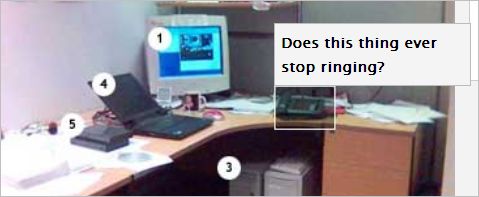
オンマウスで画像のポイント毎にテキスト表示を実現するcssのサンプルをご紹介します。
※この記事は別のブログから移行しています。
CSS Image Mapsで紹介されていたcssが凄くステキです。
1枚の画像からポイントを指定してオンマウスでテキストを表示させます。

コードサンプル
スタイルコードは以下のとおり。
dd#monitorDef{ top: 65px; left: 114px; }
dd#monitorDef a{ position: absolute; width: 73px; height: 69px; text-decoration: none; }
dd#monitorDef a span{ display: none; }
dd#monitorDef a:hover{ position: absolute; background: transparent url(office.jpg) -109px -317px no-repeat; top: -10px; left: -5px; }

dd#monitorDef a:hover span{
 display: block;
 text-indent: 0;
 vertical-align: top;
 color: #000;
 background-color: #F4F4F4;
 font-weight: bold;
 position: absolute;
 border: 1px solid #BCBCBC;
 bottom: 100%;
 margin: 0;
 padding: 5px;
 width: 250%;
}
HTMLコードは以下のように記述します。
<dl id="officeMap">
 <dt id="monitor">1. Monitor</dt>
 <dd id="monitorDef"><a href="#"><span>Here's my 17" Monitor.  I wish I had an LCD!</span></a></dd>
 <dt id="phone">2. Phone</dt>
 <dd id="phoneDef"><a href="#"><span>Does this thing ever stop ringing?</span></a></dd>
 <dt id="case">3. PC Case</dt>
 <dd id="caseDef"><a href="#"><span>This is my crazy Linux box! Gotta love that Linux...</span></a></dd>
 <dt id="notebook">4. IBM ThinkPad</dt>
 <dd id="notebookDef"><a href="#"><span>Here's my Linux notebook.  Some crazy coding going on.</span></a></dd>
 <dt id="floppy">5. External Floppy Drive</dt>
 <dd id="floppyDef"><a href="#"><span>Floppy Drive.  Ancient... I know!</span></a></dd>
</dl>
デモはリンク先でお確かめ下さい。