この記事は年以上前に書かれたもので、内容が古かったり、セキュリティ上の問題等の理由でリンクが解除されている可能性があります。
縦長になるような入力フォームにいいかな
と思ってメモ。fieldsetでグループ化された
要素単位でスライド化してくれます。下部
までスクロールする必要が無くなるのと、
どこが誤入力か分かりやすい、場所を取ら
ないなどのメリットがあります。
特に、入力項目が長いフォームは離脱率を高くする可能性も否めませんので、入力プロセスを補助するのはユーザビリティに大きく貢献出来るかと思います。IE6でも7でも動作するようです。
jQuery Stepy
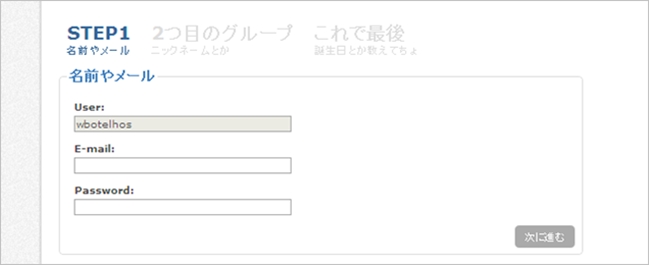
日本語に直してみました。これは1例で、3つに分けなければならないわけではありません。
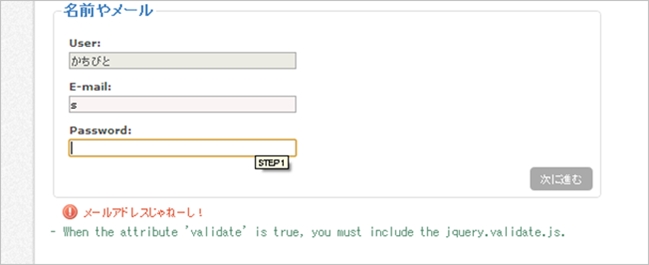
入力をミスすると、次のfieldset要素に進めない(スライドできない)という仕組み。

fieldsetごとにバリデーションチェックを行うのでユーザーもストレスが無いような有るような。
うん、ストレス無いです。(キリッ
ファイルとか
		<script type="text/javascript" src="jquery.js"></script>
		<script type="text/javascript" src="jquery.validate.min.js"></script>
		<script type="text/javascript" src="jquery.stepy.min.js"></script>
本体とプラグインファイルをセットします。
エラーメッセージ
スライド部分
				$('#custom').stepy({
					backLabel:	'戻る',
					block:		true,
					errorImage:	true,
					nextLabel:	'次に進む',
					titleClick:	true,
					validate:	true
				});
チェック項目とエラーメッセージもここで設定
					rules: {
						'email':	'email',
						'bio':		'required',
						'password':	'required',
						'day':		'required',
						'gender':	'required'
					},
					messages: {
						'email':	{email: 'メールアドレスじゃねーし!'},
						'bio':		{required: '君のこと、もっと知りたいんだ'},
						'password':	{required: 'まだパスワード入れてないよ'},
						'day':		{required: '日付まだっす!'},
						'gender':	{required: '性別!性別教えて!'}
					}
メッセージ変えてくださいね。
マークアップ
<form id="custom">
				<fieldset title="STEP1">
					<legend>名前やメール</legend>
					<label>User:</label> <input type="text" value="かちびと" size="40" disabled="disabled"/>
					<label>E-mail:</label> <input type="text" name="email" size="40"/>
					<label>Password:</label> <input type="password" name="password" size="40"/>
				</fieldset>

				<fieldset title="2つ目のグループ">
					<legend>ニックネームとか</legend>
					<label>あだ名:</label> <input type="text" name="nick" size="30"/>
					<label>君のこと:</label> <textarea name="bio" rows="5" cols="60"></textarea>
				</fieldset>

				<fieldset title="これで最後">
					<legend>誕生日とか教えてちょ</legend>
					<input type="hidden"/> <!-- Hidden fields are not focused.  -->
					<label>誕生日:</label>
					<select name="day">
						<option></option>
						<option>23</option>
						<option>24</option>
						<option>25</option>
					</select>
					<select>
						<option>10</option>
						<option>11</option>
						<option>12</option>
					</select>
					<select>
						<option>1984</option>
						<option>1983</option>
						<option>1982</option>
					</select>
					<label>性別:</label>
					<input type="radio" name="gender"/> 男性
					<input type="radio" name="gender"/> 女性
					<label>Site:</label> <input type="text" name="site" size="40"/>
				</fieldset>

				<input type="submit" class="finish" value="登録!"/>
			</form>
こんな感じでマークアップ。fieldset要素ごとにスライドします。
画像スライドも

画像にも対応してたり。
なかなか汎用性が高そうな気がします。デモもあるので触ってみては如何でしょう。
jQuery Stepy